

So you think you have what it takes to be one of the few that run their own models locally, yeah? Good news! You are not alone my friend! Much has changed and is becoming way more convenient, regardless of where your compute lives.
The main reasons for running your own private Large Language Model (LLM) usually are:
- you are as stingy/poor as me when it comes to spending your hard earned cash on the new globally introduced inference tax put on software engineers
- you are aware that privacy has its price and sending your IP, innermost thoughts & ideas straight to Sam is probably against your interest, will get taken advantage of and eventually will end up in either one of Peters or Larry's databases otherwise
- you are/were primarily a gamer that had too many GPUs laying around with more TFLOPS and VRAM than you know what to do with (talking about more VRAM for gaming: ❤️ Valve)
- you are a hardcore engineer who wants full control over every aspect of rolling out the latest open-weights large language models while being able to build and use an automated continuous model deployment pipeline, writing your own system prompts, fine-tuning the tool calling capabilities and exposing an authenticated API to build specialized autonomous agents in hopes they will replace your job one day so you can retire in peace
In that case, you have had a few options so far:
| Tech | Description | Hardcoreness Rating |
|---|---|---|
| CUDA Compute Unified Device Architecture | Most hardcore. You want control? You want to speak to your GPU directly? Eke out the last TFLOP, see every metric, and get paid in NVDA shares? Well, try to find and install the correct version that is compatible with your kernel, driver, python and torch library version (and good luck downgrading the right packages and drivers if you ever overshoot by a single minor version). Once the house of cards is assembled, you are good to go to do whatever your heart desires and your hardware can offer. |
|
| ROCm Radeon Open Compute | Even more hardcore and for the true masochist that seeks (and will find) an infinite well of pleasure in ever new painful sidequests and experiences. I'm sorry AMD… I really believed & tried… (well, half a decade ago, using your flagship Radeon RX 5700 XT 50th Anniversary Edition, in a time where clock speed mattered more than memory, but you failed to provide your hardcore users with documentation around HIP or making it easy to use. But hey! I heard good things about SGLang since then!!!). |
|
| llama.cpp |
Granular control over model loading, quantization
(1.5-bit through 8-bit integer with full control over
Q4_K_M, Q6_K, Q8_0 and more),
and hardware offloading via command-line parameters like --gpu-layers
for GPU layer offload and --tensor-split for multi-GPU setups.
Requires manual configuration but is much more accessible than raw CUDA/ROCm.
Its llama-server component speaks both OpenAI and Anthropic APIs natively.
|
|
| vllm | API-first server optimized for high throughput and more than ready for production usage. Built around PagedAttention for efficient KV cache memory management, continuous batching, tensor/pipeline parallelism, and comprehensive Prometheus metrics. Built for GPU clusters running 200+ model architectures. Total overkill for you and me or anyone not currently occupied with building a new datacenter in the desert or trying to reduce their inference bill from $22k to $4.8k (well done!). |
|
| Msty.app llama.cpp + UI | Neat, but the good stuff is behind huge paywalls. Neither full control nor the greatest UX. Well at least you can click around! To be fair: I haven't checked it out properly because of the paywall. Might be worth the(/another) subscription. |
|
| ollama | My go-to the last 2+ years. Great interoperability and integrations toward various other frameworks that wrap ollama or support it out of the box. Simple and straight-forward API. Easy download and management of new models. Write and publish your own. Horrible configuration management. Unusable search. |
|
| LocalAI | TBH: I tried it out a while back and then kinda forgot about it. But, in the meantime, as it turns out, it became awesome and provides everything you might possibly want or need: From multi-modal model discovery and installation, to skills, tools, memory and agent management over to authenticated APIs and distributed resource management or P2P / Federated Inference. Nice. |
|
| LM Studio | Least hardcore. Way too convenient and great to use. Not only comes with a server component but client/UI for all major operating systems. Offers official and maintained JS + Python SDKs (plus plenty of community-driven and open-source tools) to interact with. Comes not only with its own API but also is compliant with OpenAI API and Anthropic Messages API to provide endpoints for full compatibility. Anything you want to configure can be configured. Aaand fresh in beta for the brave explorer souls: lm-link. |
|


Ollama is great but…
…there has been what feels like almost no significant movement, were the feature set has largely stayed the same in the last 2 years around ollama other than keeping up with supporting the latest model architectures. If you are looking for stability, there you go: It's definitely the Debian of the model deployment solutions and with the right wrappers and integrations you can transform it into a Ubuntu.
Don't get me wrong, while this is a major drawback it simultaneously is the biggest thing ollama has going for itself: A great stable API that is being used by many, many other tools. With an API that would change on a daily basis it would be impossible to build the massive ecosystem that has developed around it.
But let's get to the things I really can't get my head around that haven't been implemented yet.
Search
It is mind-blowing and ridiculous to me that you can't search for models from the CLI at
all, but even the official search at
ollama.com/search
is close to useless. It is not possible to search for a text-to-text model with less than
10B parameters, or more than 5GB in size, or using a context window of >32,000 tokens,
or with semantic searches like "python coding" or "chat personas". I even went so far as to
reverse-engineer the frontend code to find out how the available search parameters work
with the API in hopes of injecting my own custom parameters, but it turns out what you
see is what you get. There also isn't a single site that created its own Ollama model card index and the only thing that was out there was a rather neglected
Open-Technology-Foundation/ollama-models repo (which since me cloning it has been deleted, lol, and believe me, it's not worth the re-upload).
Three Configuration Interfaces (and none offer completeness)
Ollama's configuration lives in three separate places with no unified interface between them, let alone providing a complete or up-to-date documentation.
Runtime serving behavior goes in environment variables:
OLLAMA_CONTEXT_LENGTH, OLLAMA_FLASH_ATTENTION=1,
OLLAMA_KV_CACHE_TYPE, OLLAMA_NUM_PARALLEL,
OLLAMA_KEEP_ALIVE. Per-model parameters like temperature, top-p, and system
prompts live in
Modelfiles
(They are actually pretty great for repeatable rollouts).
And some inference parameters can only be passed per-request in the JSON body.
I actually ended up building a tmux wrapper library to control and configure individual models via the CLI through tmux sessions, because since guess what, some aspects are only accessible via the Terminal User Interface (TUI). This is madness.
Can I haz auth plz?
By default, Ollama binds to 127.0.0.1:11434 and to expose it on your local
network you bind to OLLAMA_HOST=0.0.0.0, which is great if you want a
completely unauthenticated endpoint to anyone on your
subnet. To get TLS + auth in front of it, you then find yourself wiring up
ngrok,
frp,
or a proper reverse proxy entirely on your own just because ollama ships with zero authentication.
Customizations & fancy stuff
Tools, Model Context Protocol (MCP), skills, and other extras? Good luck. Ollama speaks tool calling in its request format, but integrating Model Context Protocol servers requires an application layer (Open WebUI, a LangChain pipeline, or your own custom wiring) on top which brings me to...
Gateways and other drugs
I simply hate and detest that we have a dozen different message and API schemas for doing essentially the same thing:
text in → your favorite model of the day → text out.
And once again, we as a collective, somehow managed to create one new standard for each new brand of models just so everyone can put their own stamp on it.
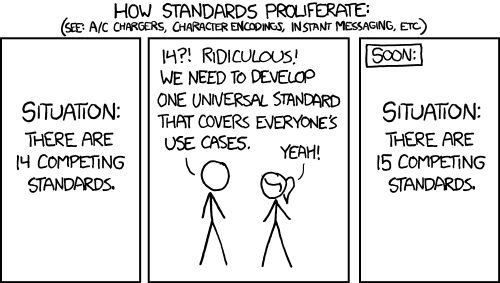
Although, to be fair, some competition in that space is a good thing and brings forward new ideas and features around those processes rather sooner than later. And, so it seems, it more and more crystallizes which formats will be around for more than the next week.
The two dominant API contracts you simply must support today are OpenAI's Chat Completions API (the de facto standard that most tools target first) and Anthropic's Messages API (with its own conversation format, content block structure, and streaming SSE shape). Every framework, agent runtime, or application that wants to be provider-agnostic needs to speak at least those two.
If you're building on the TypeScript side, the meta-library to cover them all is the Vercel AI SDK. It provides a single unified interface across OpenAI, Anthropic, Google, Mistral, Amazon Bedrock, and 30+ other providers. Switching providers is typically a two-line change: swap the provider import, swap the model string. It even handles LM Studio as an OpenAI-compatible provider out of the box, so your local-first and cloud-deployed code can share the same SDK calls.
Luckily more and more solutions pop up (on a weekly basis it seems), that aim to cover all providers, all models, all message formats in one place using central gateways, configurable in one place, with smart features like load balancing on top. But now we are drifting too far away from the actual LLM provisioning, achieved by modern tools such as...
LM Studio
Model Discovery That Doesn't Make You Want to Cry
LM Studio's built-in Model Catalog operates on a (surprisingly usable) "Staff Pick" recommendation system which looks at your hardware, the latest and best performing models for tool-use, reasoning, or visual tasks and then matches you up. Before you download anything it shows estimated VRAM requirements which is huge. No more "downloaded 15 GB to discover my 8 GB card can't run it" moments.
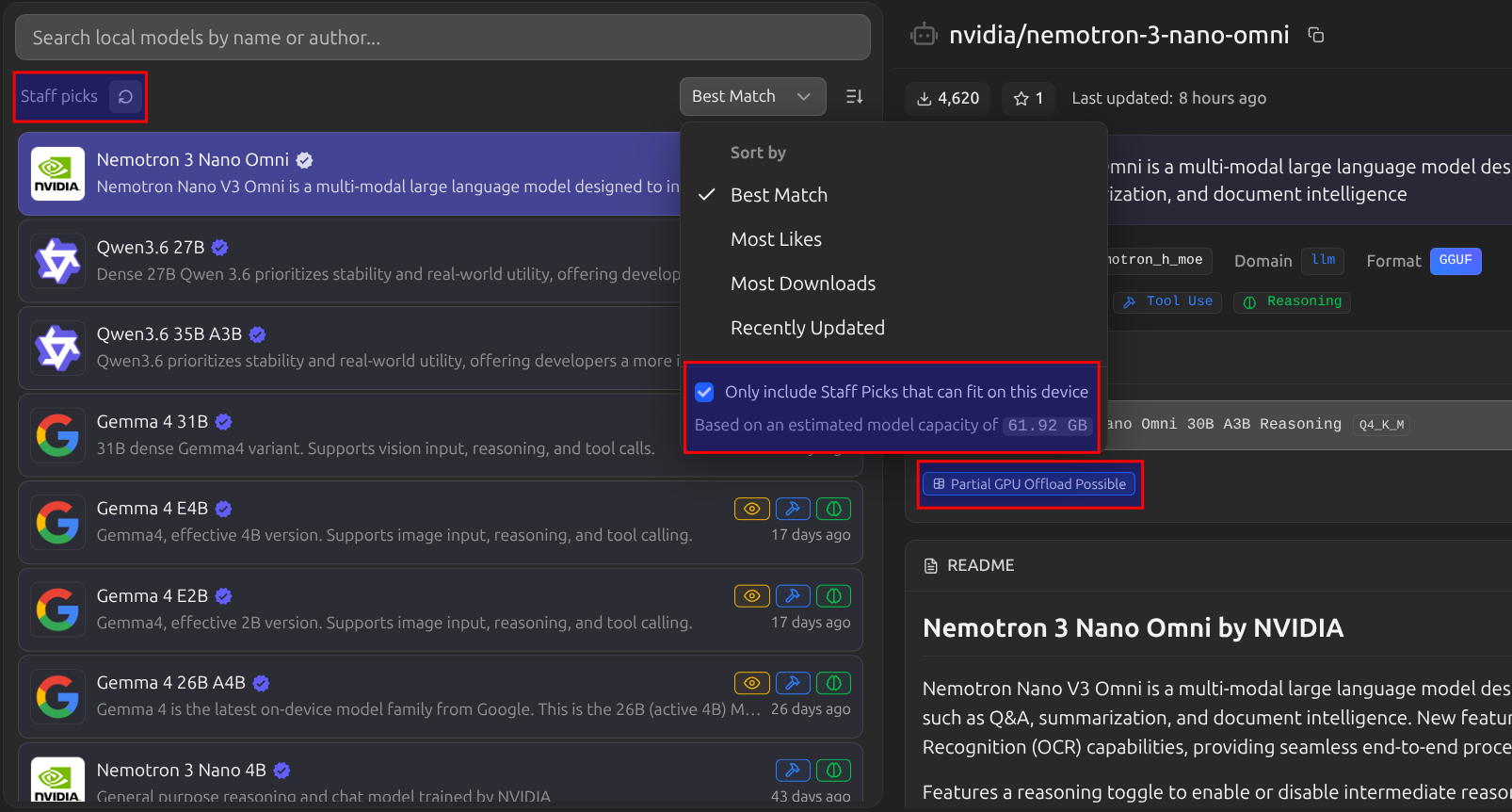
It is still lacking the granularity HuggingFace offers, but given the quality of their recommendations, I must confess, I couldn't have found better suited models myself, and starting to trust their picks.
Just-In-Time Model Loading
LM Studio's JIT loading flips the mental model around model serving entirely. When enabled (the default), any request to an inference endpoint that references a model that isn't already ready will automatically load it before responding. Just make sure to adjust any timeouts accordingly, especially for first-time requests and non-streaming sessions, given the model, it obviously takes some time to move the layers from your disk onto your GPU. Combined with Auto-Evict (unloads the previous model to make room) and configurable idle TTL (auto-unloads after N minutes of inactivity, default 60), you get fully automatic model lifecycle management without lifting a finger.
Your client just asks for "model": "google/gemma-3-9b-instruct". LM Studio
loads it, serves the request, and frees VRAM once it's idle. You stop worrying about which model is loaded right now and start actually building things.
Going Headless: llmster
If you're running on a GPU rig, server, or cloud Virtual Machine (VM), reliance on GUIs becomes a liability.
llmster
is the headless daemon mode which is the core inference engine extracted from the desktop app,
packaged to be server-native. No GUI required.
# Start the daemon
lms daemon up

# Download a model
lms get google/gemma-3-9b-instruct

# Start the API server (port 1234 by default)
lms server start
You can configure it to
run as a systemd service on startup,
leveraging JIT loading so you don't even need to pre-load a specific model and it will load
whatever the incoming request asks for (fingers-crossed it fits).
Authentication: Built-In, Finally
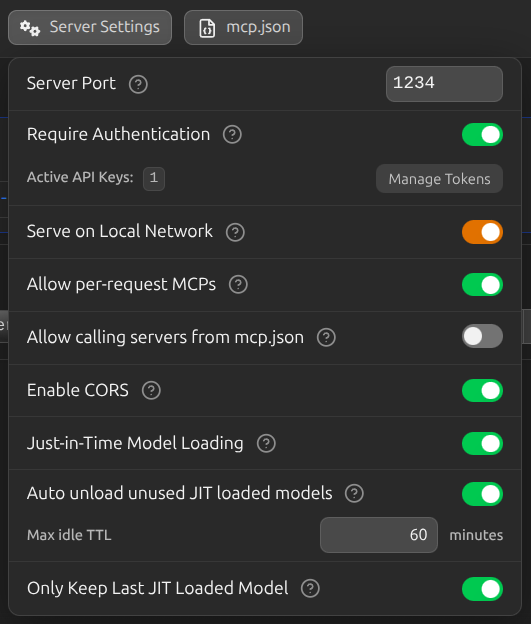
LM Studio
ships authentication
out of the box. Enable "Require Authentication" in the Developer tab, generate an API
token, and clients send it via Authorization: Bearer <token> or
x-api-key: <token>. No middleware. No reverse proxy config. No DIY
solutions.
Both the OpenAI-compatible endpoints and the Anthropic-compatible
POST /v1/messages
endpoint
respect the same auth token, meaning Claude Code, OpenAI clients, and your own scripts
can all point at your local LM Studio instance with
zero code changes, just a
base_url swap.
We want: Distributed Inference
And when do we want it? Now!
If your compute is all over the place (multiple GPUs across multiple machines, plus remote CPUs on remote servers) then this automatically brings with it a massive ops overhead mainly stemming from the required hookup efforts of proxies, auth, routing, etc. Every time you want to run a different model you're manually SSHing somewhere, checking the system specs, available VRAM, loading the right binary, and updating your client/application config to point at the right inference address to use the right model using the right message protocol.
This is the problem LM Link was built to solve. It's brand new (currently in preview with rolling access) but the concept is exactly right and all I ever wanted:
Load models on remote machines and use them as if they are local.
Under the hood, LM Link uses
Tailscale
mesh VPNs for end-to-end encrypted connections between your devices. Your APIs are never directly exposed to the public internet and communicate through Tailscale's
private overlay network (which unfortunately requires some additional VPN split tunneling depending on your existing VPC/VPN/network setup). Once linked, remote models become usable in your LM Studio model loader exactly like local ones, with an indicator on where the model is actually loaded and living. Your API calls still go to localhost:1234; LM Studio
internally routes them to whichever device has the right model loaded.
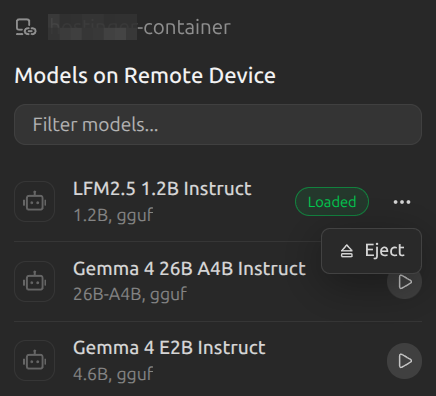
This pairs beautifully with JIT loading: your laptop makes a request for a 40B model it can't run locally, LM Studio sees that model is available on your home GPU rig, routes the request there, and responds - all transparent to your application code.
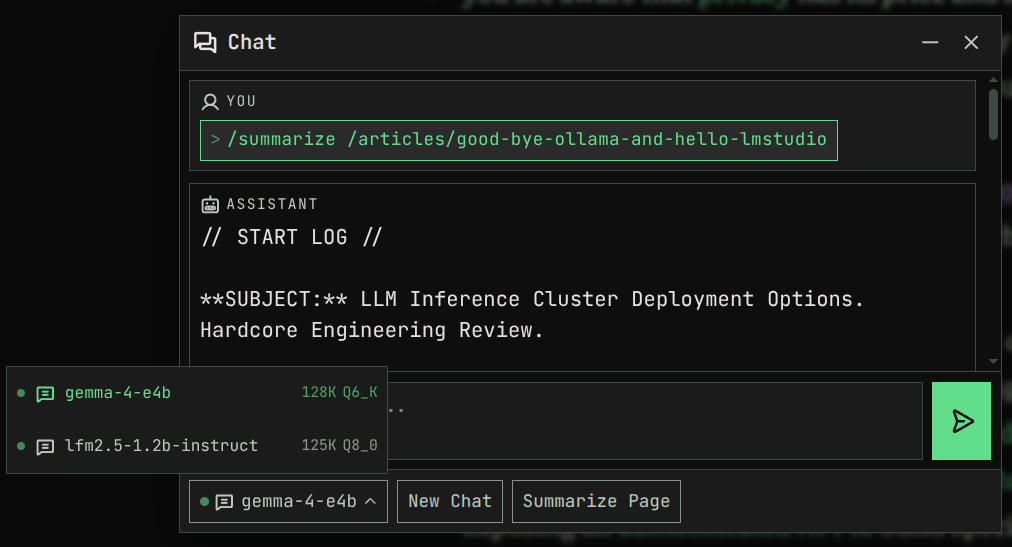
By the way, the /chat of this website is using an LM Studio LLM cluster across multiple machines (some CPU, some GPU, whatever is available), all private and hosted by me. Try it out by using /summarize or some other LLM command from the command box:
For those who prefer the fully open-source route (with some DIY on top), LocalAI's distributed compute enables you to go even one step further with true model sharding: it can split individual model weights across multiple workers so a 70B model that won't fit on a single GPU can be distributed across two or three machines, each handling a subset of transformer layers. This is closer to proper distributed inference rather than simple request routing, and it's been production-tested across the LocalAI community for longer than LM Link has existed.
Closing Thoughts and Remarks
Ollama probably won't go anywhere (in the positive and negative sense). It's MIT licensed, has a stable API that half the ecosystem builds on, runs as a proper background daemon from day one, ships a first-class Docker image, and is the right choice when you're wiring local inference into Continuous Integration (CI)/CD pipelines, automated scripts, or containerized services where GUI ergonomics literally don't matter and you want less convenience in favor of maximum stability + repeatability.
LM Studio, on the other hand, is closed-source (though free for personal and commercial use). If that's a dealbreaker, then, well, break the deal. But given how it freed up so much time for me already, of not having to search for the best models on a given spec myself, setting up auth and proxies, dealing with message format incompatibilities, loading and unloading short-lived models, etc. it will definitely stay a little longer on my machines (fully linked with one central point of entry).
However, after writing this article and re-discovering Local AI I'll also more closely check out how powerful it has become, especially in regard to their peer-to-peer (P2P) networking for distributed inference, which in my not so humble opinion will be the next big milestone in the evolution towards greater consumer controlled AI.
The days of having to go full hardcore to run your own inference on your own hardware are over. My agents are running, my available VRAM is optimally utilised, and I haven't had to manually re-route and transform requests or write a single line of auth middleware code in weeks. Let's just say with that much convenience I'll expect more people to jump on board and start using their own setup.