
> When to Automate a Task
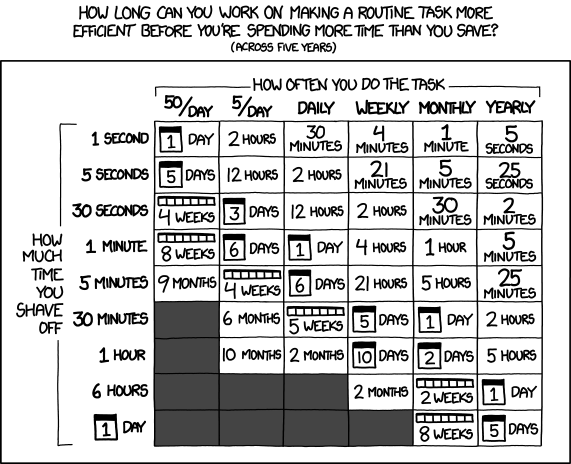
How long can you work on making a routine task more efficient before you're spending more time than you save? Use the interactive app to find out what ROI to expect on your automation efforts. You will be surprised how much time you are currently wasting on repeating "small" 5 min tasks.
# Time Budget Matrix
Maximum time you can spend automating (across your selected time horizon)
# Worth It?
ROI gauge for your current selection
# Time Comparison
Time invested vs. time saved
# Depth Level 1: A Programmable REST API
The app above is a great toy for calculating the ROI of task automation one task at a time.
But in the full spirit of automation, of course I provide you with a public REST API.
Any automation script, a cron triggered job, or even an agent equipped with curl
can ask the same question without having to use a browser.
I mean, feel free to teach an agent to use playwright navigate here and click buttons,
but we both know this is not the way to go.
Instead, you (and your agents) should get familiar with the offered public API functionality, neatly packed in our machine readable OpenAPI spec. If you still insist on clicking around in the browser yourself, then pick your poison of either:
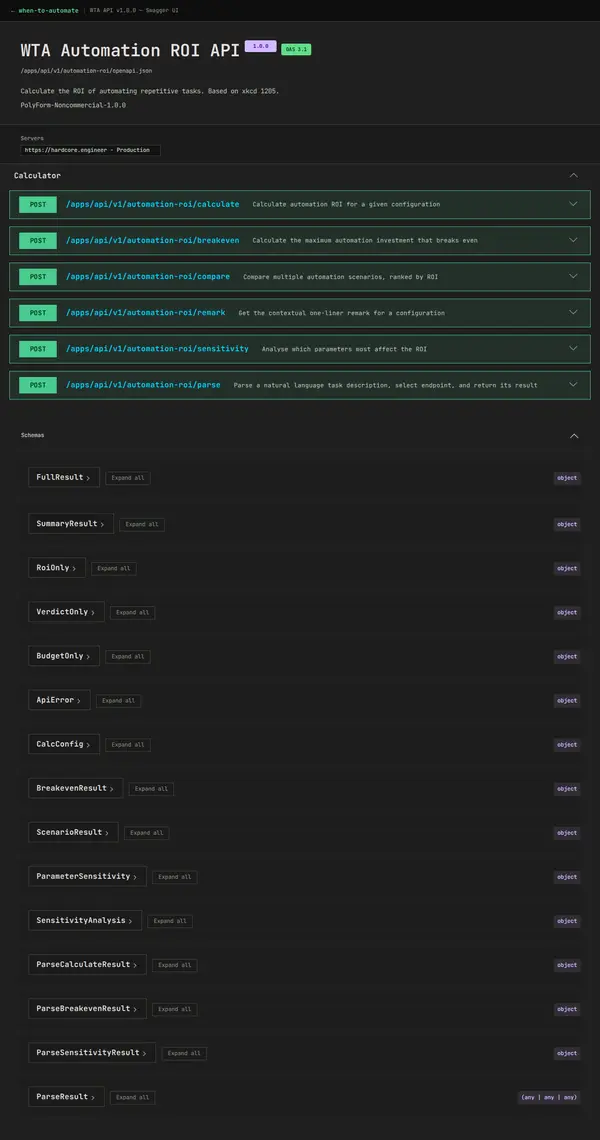
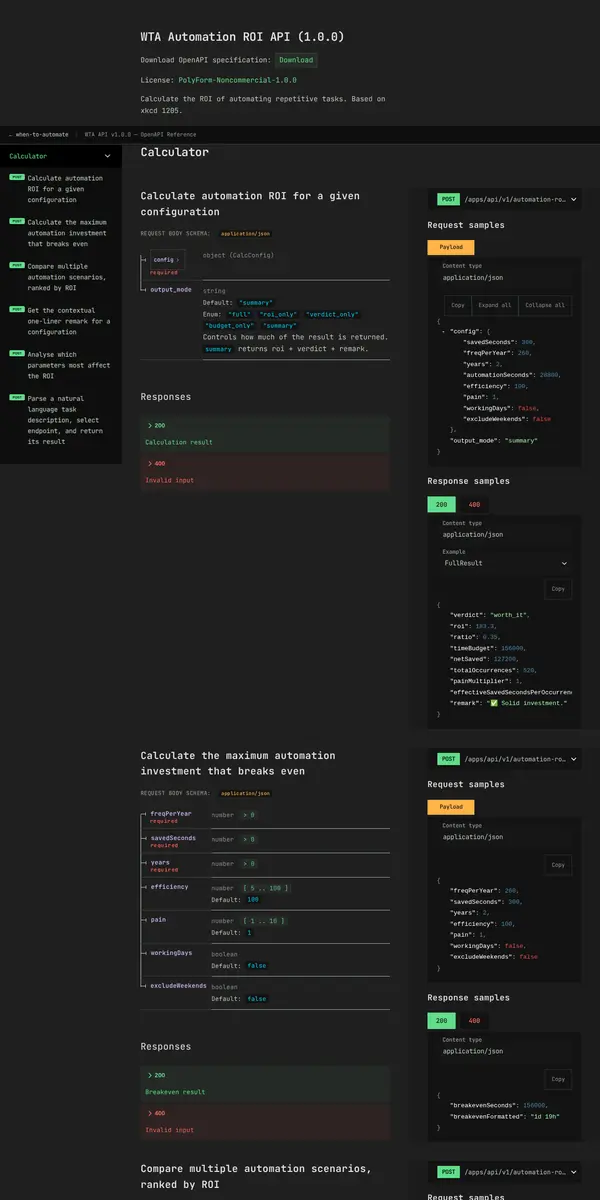
The Swagger UI doubles as a request console: pick an endpoint, fill the form, hit
Try it out, and the
response comes back in your browser. No curl required.
However, below is the quick
tl;dr overview of all endpoints with quick copy buttons for the endpoints and
curl example requests.
Smash this into your terminal shell and see it in action!
# Depth Level 2: Explore, Play, Try It Yourself
POST /parse.
The
POST /parse endpoint takes a description of a problem or task you want to automate in natural language form
(only tested with English but should work with any language as long as the underlying model speaks it),
sends it to an
LLM which extracts structured input values, infers missing values via "common sense",
picks the right endpoint, runs the math, and returns a verdict. This is perfect for agents, chat UIs, and quick triage.
Obviously, the more detailed, better structured, and less ambiguous your input query, the more precise the inference of input values, accurate the estimation, and solid the resulting math. However, with a "good enough" reasoning LLM which simultaneously is hooked up to search, it will manage even if you throw it some curveballs like:
# Depth Level 3: Meet The Remote MCP Server
REST APIs are great! But the Model Context Protocol is what plugs a tool directly into every modern agent framework, with almost zero effort. So, instead of feeding each agent with the API specs, teaching it how to format requests, prompting it to write requests in the scripting language of its choice, you point them at one URL and they discover every tool, schema, and examples automatically.
Almost every MCP client is using their own custom configuration schema for setting up a remote MCP Server.
Select your Agent system below, copy, then use the configuration snippet in your setup.
Reload your agent and enable the MCP server and your agent should see five brand new tools: calculate, compare,
breakeven, sensitivity, and
parse. No glue code, no prompt engineering.
Don't get me wrong, I'm not the greatest fan of MCPs. They come with some downsides, especially when using a weak MCP client lacking nowadays basic capabilities like:
- On-Demand MCP server & tool discovery (which keeps the initial context window small)
- Detection, filtering and redaction of sensitive information (like passwords and keys)
- Blocking of prompt injection and other injection attacks
to name a few. Don't just add any random MCP server to your system, especially if unguarded and without a sandbox. I'm going to write some articles around that topic, soon. Until then: Be thorough, think before you add, stay safe.
# Depth Level 4: A Slash Command
If you find yourself in the situation of repeatadly prompting an LLM to do the same thing, execute the same tool,
ask the same question over and over again, then you know its time to shortcut that action by writing a /command.
As our automation ROI tool will tell you: Every few seconds shaved off a repated task, frees up time in the future.
For a frictionless trigger, drop this into your commands directory like .commands/automate.md
(Check which one your agent framework is actually using).
Then typing
/automate followed by the task details as input in your chat,
fires up your agent to use the MCP tool.
---
description: "Calculate if a repetitive task is worth automating. Provides ROI, payback period, and net time saved."
---
You have access to the `automation-roi` MCP server's analysis tools.
Analyze this task description and call the appropriate tool:
$ARGUMENTS
## Tool selection
| Input pattern | Tool to call |
| ------------------------------------------ | ------------ |
| Natural language description of a task | `parse` |
| "Should I automate X?" / "Is it worth it?" | `parse` |
| "How much time can I spend building this?" | `breakeven` |
| "Compare task A vs B" / "Which first?" | `compare` |
| Structured parameters already known | `calculate` |
## Response format
Verdict, ROI %, payback period, net time saved, and a one-line remark.
## Guidelines
- Ask at most 1 clarifying question if frequency or duration is missing
- Default to a 2-year time horizon when not specified
- If automation is worth it, offer to build it
- If not, suggest a lighter alternative or doing nothing# Depth Level 5: Deep Integration with Skills
An MCP server gives your agents new tools to use, but to fully unlock the newly gained capabilities
you should teach and instruct them on when to use that tool and how to get the most out of it.
Skills are essential
for creating deep integrations. Drop the following into your skills directory like
.skills/automation-roi/SKILL.md
and the agent will automatically invoke the right MCP tool whenever it considers writing an automation script.
---
name: automation-roi
description: >
  Use BEFORE writing, planning, or scaffolding any automation
  script, macro, or workflow. Also when the user asks "should I
  automate this?", "is it worth automating?", "how long can I
  spend building this?", "which task to automate first?", or any
  question about time savings vs automation cost.
---
# Automation ROI Skill
Before writing any automation, run the numbers. This is a hard stop.
> **Stop if you're thinking:** "It's just a quick script" · "Obviously worth it" ·
> "It'll only take an hour" · "Everyone automates this"
> Those are the exact cases where the ROI is worst. Run the numbers anyway.
## Step 1 — Pick one tool
| Situation | Tool |
| ---------------------------------------------------- | ------------------------ |
| User describes task in plain English | **`parse`** ← start here |
| You already have frequency, duration, cost | `calculate` |
| "How long can I spend building this?" | `breakeven` |
| 2+ tasks to prioritise | `compare` |
| Got a borderline result, need to know what to refine | `sensitivity` |
| Gut-check one-liner only (no breakdown) | `remark` |
**Default: `parse`.** Pulls all four required numbers from free text and runs the calculation in one call.
## Step 2 — Call the tool
### `parse` — natural language in, full result out
```json
{
"text": "I spend 5 minutes every weekday reviewing Slack alerts",
"output_mode": "summary"
}
```
**Returns:**
```json
{
"extracted_config": { "savedSeconds": 300, "freqPerYear": 260, "years": 2, "automationSeconds": 28800 },
"result": { "verdict": "worth_it", "roi": 183.3, "remark": "✅ Solid investment." },
"confidence": 0.85,
"notes": "Assumed 2-year horizon and 1-day build effort"
}
```
> **Allow 10–50 s** — `parse` calls an LLM internally. Do not time out early.
> If `confidence < 0.6` or `estimated: true` on any core param, confirm the values with the user before presenting as authoritative.
> **Fallback:** low confidence → call `calculate` with your own estimates.
### `calculate` — core ROI with known numbers
Required — all four:
| Field | Max | Example |
| ------------------- | ---------------- | ----------------------- |
| `savedSeconds` | 86400 (24 h) | `300` = 5 min |
| `freqPerYear` | 36500 | `260` = daily weekdays |
| `years` | 50 | `2` |
| `automationSeconds` | 157680000 (5 yr) | `28800` = 8 h |
Optional: `efficiency` 5–100% (default 100) · `pain` 1–10 (default 1) · `workingDays` bool · `excludeWeekends` bool
```json
{
"config": { "savedSeconds": 300, "freqPerYear": 260, "years": 2, "automationSeconds": 28800 },
"output_mode": "summary"
}
```
`output_mode`: `summary` (default — verdict + roi + remark) · `full` · `roi_only` · `verdict_only` · `budget_only`
Verdicts (ratio = automationSeconds / timeBudget):
| Verdict | Ratio | What it means |
| --------------------- | ------- | ----------------------------------------- |
| `absolutely_worth_it` | ≤ 0.5 | Build it now |
| `worth_it` | ≤ 1.0 | Worth the investment |
| `borderline` | ≤ 2.0 | Marginal — check pain, run `sensitivity` |
| `not_worth_it` | > 2.0 | Stop — suggest a lighter alternative |
| `greyed_out` | n/a | Impossible inputs (e.g. saves > 24 h/day) |
`remark` tool: same config as `calculate`, returns one emoji verdict sentence. Use for gut-checks only.
### `breakeven` — what's the maximum I can spend?
Same params as `calculate`, minus `automationSeconds` — the API finds the ceiling for you.
```json
{ "savedSeconds": 300, "freqPerYear": 260, "years": 2 }
```
→ `{ "breakevenSeconds": 156000, "breakevenFormatted": "1d 19h" }`
Also accepts `efficiency`, `pain`, `workingDays`, `excludeWeekends`.
### `compare` — rank multiple candidates by ROI
```json
{
"scenarios": [
{ "name": "Daily alert triage", "config": { "savedSeconds": 120, "freqPerYear": 260, "years": 2, "automationSeconds": 14400 } },
{ "name": "Weekly report", "config": { "savedSeconds": 1800, "freqPerYear": 52, "years": 2, "automationSeconds": 28800 } }
]
}
```
Returns scenarios sorted by ROI descending, each with `rank`, `verdict`, `roi`, `remark`. Build rank 1 first.
### `sensitivity` — which estimate matters most?
Use when the result is `borderline` and you need to focus. Doubles and halves each parameter; returns the ROI swing per parameter.
```json
{ "config": { "savedSeconds": 300, "freqPerYear": 260, "years": 2, "automationSeconds": 28800 }, "multiplier": 2 }
```
→ Returns `roiRange` per param. **Highest `roiRange` = biggest uncertainty.** Ask the user to pin that number down before deciding.
## Step 3 — Act on the verdict
| Verdict | Action |
| ---------------------------------- | ------------------------------------------------------------- |
| `absolutely_worth_it` / `worth_it` | Proceed with implementation |
| `borderline` | Run `sensitivity` → refine the top param → re-run `calculate` |
| `not_worth_it` | Stop. Offer: alias, manual checklist, or nothing |
| `greyed_out` | Ask the user to recheck their inputs |
**`not_worth_it` is a hard block.** State the verdict plainly. Do not proceed.
## Quick reference
**Frequency (`freqPerYear`):**
| Every… | Value |
| -------------- | ----- |
| Day (weekdays) | 260 |
| Day (all days) | 365 |
| Week | 52 |
| Month | 12 |
| Quarter | 4 |
**Duration (seconds):** 1 min = 60 · 5 min = 300 · 15 min = 900 · 1 h = 3 600 · 4 h = 14 400 · 8 h = 28 800 · 1 day = 86 400# That's it
I'm aware there is a lot of pessimism around LLMs, AIs, and especially agentic workflows floating around these days. But TBH, I strongly believe agents are here to stay. It is still early days, yet frameworks and protocols like MCP & SKILL.md evolved, which when used and integrated smartly, are clearly able and capable of unlocking value (especially in and through automation) today.
Would I blindly trust this to make the right call and automatically approve and create a billion dollar PUT to hedge against an upcoming tropical storm that might hit a coastal area? Probably not yet, but the (current) power of agentic workflows lies not in its infallibility but their fuzzy and highly adaptable natural language interfaces, capable of parsing and "understanding" a multitude of highly variable input requirements and transforming them into machine executable instruction sets. Good luck writing the same in PERL.
ACHIEVED OUTCOME FOR USER MILLIONS SAVED!!!
INITIAL PROBLEM
use of private jets
APPLIED SOLUTION fly 1st class instead
If this tool helped you save a couple of bucks, fiber, ninja, quid, or you learned something new, consider sponsoring my liquified psychoactive stimulant drug addiction to keep me going.
Just don't be a d1ck and DDoS the (rate-limited) API, write a wrapper without mentions, or embed this as a core functionality in one of your highly profitable unicorn apps without sponsoring my caffeine addiction.
NOT COOL DDoS · wrapper without credit · use in unicorn apps
ALWAYS WELCOME bug reports · ideas · questions · improvements

BUY ME A COFFEE
buymeacoffee.com/hardcore.engineer
$ buy --coffee
# The Inspiration & Original Comic